
Top Touch Screen Kiosk Manufacturers for Global Buyers

A Touch Screen Kiosk is no longer just a screen beside a queue. It can handle check-in, ordering, payments, and wayfinding, while giving staff more time for complex requests. Adoption is expanding across retail, transport, healthcare, and hospitality. Still, a kiosk only works well when its hardware, software, and support fit the place using it.

Industry forecasts point to continued investment, though market definitions vary. Grand View Research’s Self-Service Kiosk Market report valued that market at USD 30.8 billion in 2023 and projected an 11.8% compound annual growth rate through 2030. MarketsandMarkets estimated growth from USD 24.2 billion in 2023 to USD 34.4 billion by 2028. These figures cover different scopes, so they are useful signals, not directly comparable totals. Forecasts are not purchase orders.

For global buyers, choosing a manufacturer means looking beyond a bright display. Consider screen responsiveness, enclosure durability, accessibility, integration options, cybersecurity practices, and local maintenance coverage. A kiosk in a sunlit station faces different demands from one in a quiet clinic. Ask how components are tested, what service response times are offered, and whether replacement parts are available in your region. Small details matter. The rankings that follow compare manufacturers through practical criteria, while recognizing that no supplier is right for every deployment. One point deserves scrutiny: impressive specifications mean little if users cannot complete a task quickly.
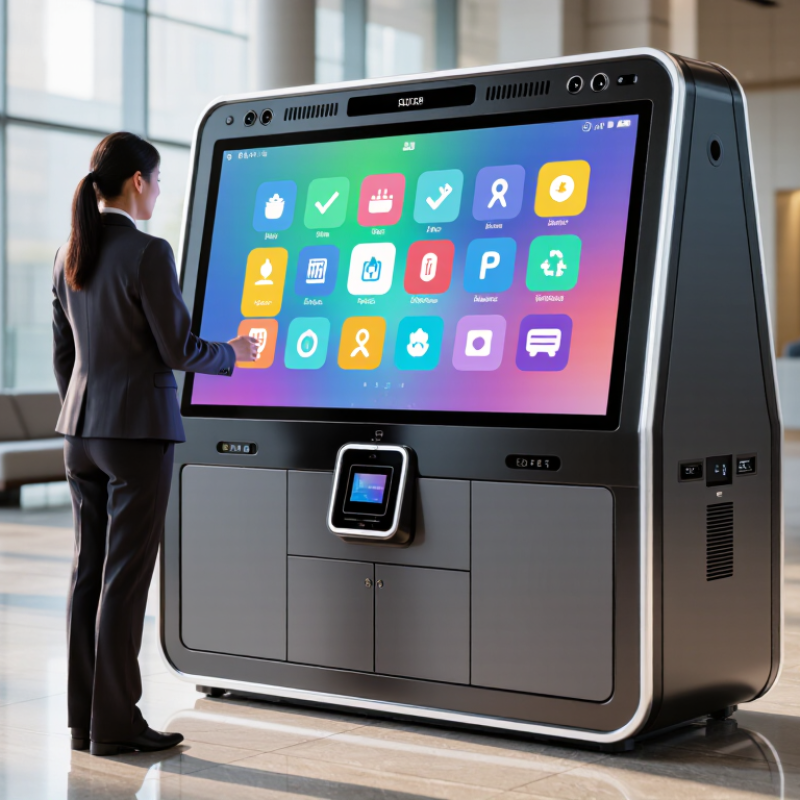
Top Touch Screen Kiosk Manufacturers for Global Buyers

What Touch Screen Kiosk Manufacturers Produce

Touch-screen kiosk manufacturers produce complete self-service terminals, not just display panels. Typical builds combine a touch display, steel or aluminum enclosure, computing unit, power supply, and mounting hardware. They may also integrate receipt printers, barcode readers, payment modules, cameras, or accessibility controls. A retail counter unit might print a queue ticket, while a freestanding clinic kiosk could capture check-in details and scan documents. Details matter.

Manufacturers also adapt brightness, screen size, and enclosure design to the installation. A sunlit lobby needs a brighter display; a busy transit hall needs a stable base and surfaces that staff can clean quickly. Some units are custom-built, while others use modular components that simplify repairs. In practice, a “rugged” specification does not guarantee low maintenance. Ports, hinges, and thermal management still deserve close inspection.

Grand View Research estimated the global self-service kiosk market at USD 30.8 billion in 2023, with projected growth through 2030. That figure covers a broader kiosk category, not touch-screen hardware alone, so it should be treated as market context rather than a touchscreen sales measure. Buyers comparing manufacturers can request component lists, operating-temperature ranges, warranty terms, and service documentation. A polished demo is useful, but it rarely shows dust buildup or repeated screen use.

Typical Touchscreen Size Ranges by Kiosk Application

Representative screen diagonal options, in inches

Touch screen kiosk manufacturers produce solutions for checkout, information, ticketing, ordering and outdoor payment. Screen sizes vary by model and project requirements; the ranges shown are representative options, not a measure of market share or a standard for every kiosk.

How Global Buyers Can Compare Manufacturers

Compare touch screen kiosk manufacturers against the same use case, not just the same product photo. A bright lobby, a dusty warehouse, and an outdoor ticket area create different demands. Ask for measured brightness, screen durability, operating temperature, and touch performance with the gloves your staff actually wear. Request a sample unit or live demonstration. Test your own interface, including small buttons and longer forms.

Tips: Put key requirements in a simple comparison sheet. Ask each manufacturer to confirm warranty terms, spare-part availability, customization costs, and typical production lead times in writing. Check what testing or quality records they can share, and clarify which certifications apply to your target market.

Look beyond the quotation. A lower unit price may exclude mounting hardware, software integration, or replacement components. Ask who handles technical support across time zones and how faults are diagnosed. A clear escalation path matters. Review sample inspection criteria before placing an order, such as checking screen response at the corners and confirming ports match your design. One imperfect detail: polished demonstrations can hide setup limits. Compare the kiosk under realistic conditions, then record any unanswered questions before choosing a supplier.

Which Technologies and Customization Options Matter

For global kiosk buyers, the screen is only one part of the decision. Grand View Research estimated the self-service kiosk market at USD 34.4 billion in 2023, with projected annual growth of 7.1% from 2024 to 2030. That growth makes careful specification more important, not less. In a bright station lobby, a high-brightness display can reduce glare; in a busy café, a responsive multi-touch panel helps guests move through menus quickly. Ask manufacturers to demonstrate touch accuracy with the gloves staff actually wear. Small details matter.

Customization should match the task and the site. A transport kiosk may need a barcode scanner, contactless payment, and a receipt printer, while a visitor terminal may need adjustable screen height and a privacy filter. Check operating temperature, screen durability, service access, and remote monitoring before approving a design. Accessibility features deserve hands-on testing: can a seated user reach the controls, and can the interface be read without squinting? Not every upgrade pays. I have seen feature lists grow while basic maintenance access gets overlooked. Request a working prototype and test it under real lighting, with real users, before committing to a fleet.

How Certifications and Regional Support Affect Selection

For global buyers, a kiosk certificate is useful only when it matches the installation and market. Ask manufacturers for test reports tied to the exact screen, power supply, and enclosure—not just a certificate logo. Electrical safety, electromagnetic compatibility, and ingress protection matter in different ways. A unit beside a bright, dusty entrance faces different risks from one inside a climate-controlled lobby. IEC 62368-1 is a relevant safety standard for many audio, video, and information technology products; confirm local acceptance with the importer or testing body. Details matter.

Regional support can determine whether a small fault becomes a long outage. Grand View Research’s 2023 report estimated the interactive kiosk market at USD 30.56 billion in 2022 and forecast 6.9% annual growth through 2030. A growing market brings more deployments, but it does not guarantee nearby service. Ask about local spare screens, replacement lead times, language coverage, and who handles warranty claims. Request a sample service-level agreement. Then test the support route with a realistic case, such as a cracked touch panel or a failed payment peripheral. A polished response in a sales meeting is not the same as repair capacity. I would still check references from the intended region; one missed detail can change the decision.

How to Evaluate Leading Manufacturers for Your Project

Global demand is expanding, but market growth alone cannot identify a dependable supplier. Grand View Research valued the global self-service kiosk market at USD 34.4 billion in 2023. It forecast an 11.2% compound annual growth rate from 2024 to 2030. That matters. Yet a growing market does not guarantee strong engineering, consistent production, or responsive support.

Evaluate manufacturers against your actual setting. A kiosk beside a bright shop window needs a readable display and effective glare control. A busy reception area needs a stable base, accessible ports, and a casing that withstands frequent cleaning. Ask for documented touch-screen response, operating-temperature ranges, component availability, and warranty terms. Request inspection records and references for comparable deployments. Test a production sample, not only a polished showroom unit.

Manufacturing capacity deserves close scrutiny. Ask how the supplier handles component substitutions, quality checks, and spare-part requests after delivery. Request a written schedule covering prototype approval, production, shipping, and installation. Then run a small pilot under real conditions. Measure touch accuracy, screen visibility, and service response over several weeks. One detail is easy to miss: a technically capable factory may still communicate poorly across time zones. Record answers, exceptions, and unresolved questions before placing a large order. The evaluation may feel less tidy than a checklist suggests, but that friction can reveal practical risks early.

Top Touch Screen Kiosk Manufacturers for Global Buyers - How to Evaluate Leading Manufacturers for Your Project
Manufacturer Evaluation Matrix: compare documented capabilities against your application, deployment environment, and destination-market requirements.
Evaluation Dimension What to Compare Evidence to Request Project Evaluation Guidance
Touch technology Projected capacitive (PCAP), infrared, or other touch technology; supported touch points; performance with gloves or through a protective cover. Touch-controller specifications, operating instructions, and a demonstration using the intended gloves, gestures, and screen cover. PCAP is widely used for interactive kiosks. Confirm performance under the actual conditions of use rather than relying on a technology label alone.
Display size and orientation Available diagonal sizes, native resolution, portrait or landscape mounting, viewing angles, and screen aspect ratio. Product datasheet, mechanical drawings, and a sample display showing the intended content layout. Match resolution and aspect ratio to the user interface and viewing distance. Check that mounting orientation is supported by the display manufacturer.
Brightness and readability Rated brightness, contrast, anti-glare treatment, and readability under the expected indoor or outdoor lighting conditions. Display specification identifying brightness in cd/m², plus test conditions and any ambient-light control options. Compare brightness figures measured under equivalent conditions. For sun-exposed installations, validate readability on a sample unit at the actual site.
Environmental protection Ingress protection for the complete kiosk assembly, temperature and humidity limits, ventilation, and suitability for dust, rain, or cleaning routines. Test report or certificate identifying the tested enclosure, configuration, and IP rating under IEC 60529. IP ratings apply to tested configurations; a component rating does not automatically establish the rating of the finished kiosk. Check installation and maintenance instructions.
Impact resistance Screen and enclosure impact resistance, including whether the stated rating applies to the glass, the enclosure, or the complete unit. Test documentation identifying the tested part and the classification method, such as an IK rating under IEC 62262. Specify the risk of impact at the installation site. Do not treat an IK rating as a measure of weather resistance or general product durability.
Computing and connectivity Operating system support, processor and memory options, storage, network interfaces, USB or serial ports, and remote-management capabilities. Hardware configuration sheet, supported operating-system versions, port map, and network or device-management documentation. Confirm compatibility with your application, payment peripherals, network security policies, and planned software update process.
Peripherals and integration Compatibility with printers, barcode readers, cameras, card readers, payment terminals, speakers, and mounting or cable-routing requirements. Interface specifications, integration drawings, peripheral compatibility list, and a test plan for the complete configuration. Identify which peripherals are supplied, optional, or provided by third parties. Validate the end-to-end setup before placing a volume order.
Safety and market compliance Applicable electrical-safety, electromagnetic-compatibility, radio, and materials requirements for each destination market. Declarations, test reports, and certificates relevant to the exact model and configuration; confirm model identifiers and issuing bodies. Requirements vary by country and product configuration. IEC 62368-1 is a product-safety standard used for audio/video and ICT equipment; it does not replace required local approvals.
Manufacturing quality Documented quality controls, inspection stages, traceability, change management, and handling of non-conforming products. Quality-system documentation, sample inspection records, process audit information, and a written change-notification procedure. Ask whether any claimed management-system certification is current and covers the relevant manufacturing site and activities.
Customization and tooling Options for enclosure dimensions, color, branding, mounting, cable access, and integration of project-specific hardware. Written scope, engineering drawings, prototype plan, tooling ownership terms, and approval milestones. Separate standard options from engineering changes. Agree on design approval and validation steps before production tooling or volume manufacturing.
Warranty and service Warranty duration and exclusions, repair or replacement process, spare-parts availability, and technical support coverage. Written warranty terms, service-level details, spare-parts policy, and escalation contacts for each sales region. Warranty terms are supplier-specific. Compare coverage, response process, shipping responsibility, and support hours rather than duration alone.
Delivery and lifecycle Quoted lead time, packaging, shipping terms, production capacity, product-change notices, and expected availability of replacement parts. Current quotation, delivery assumptions, packaging specification, lifecycle statement, and written end-of-life notification policy. Confirm whether lead times apply to samples or production orders, and clarify responsibility for freight, customs clearance, and import duties.
Sample and acceptance testing Availability of pre-production samples and a defined acceptance process for appearance, touch response, connectivity, and environmental conditions. Sample order terms, agreed test checklist, inspection criteria, and written procedure for handling defects. Use the same approved configuration for validation and production. Record acceptance criteria before the order is released.
Comparison method: Score each manufacturer against the same project requirements, retain supporting documents for every score, and treat unverified claims as items requiring confirmation—not as established capabilities.

Learn More

Connect with us today to learn more about our industrial automation solutions—and how to commission them for your application.